Appearance
Module 3 · Your first campaign
Leer en español: Módulo 3 · Tu primera campaña.
Goal: create and start a campaign with the 3-step wizard, and understand why abandonment at 3% is locked — and why that works in your favor. Time: ~8 minutes · Before: Module 2 (you need imported accounts).
1. The campaigns screen
In Campaigns you see each campaign with its state, its pace and its live abandonment:
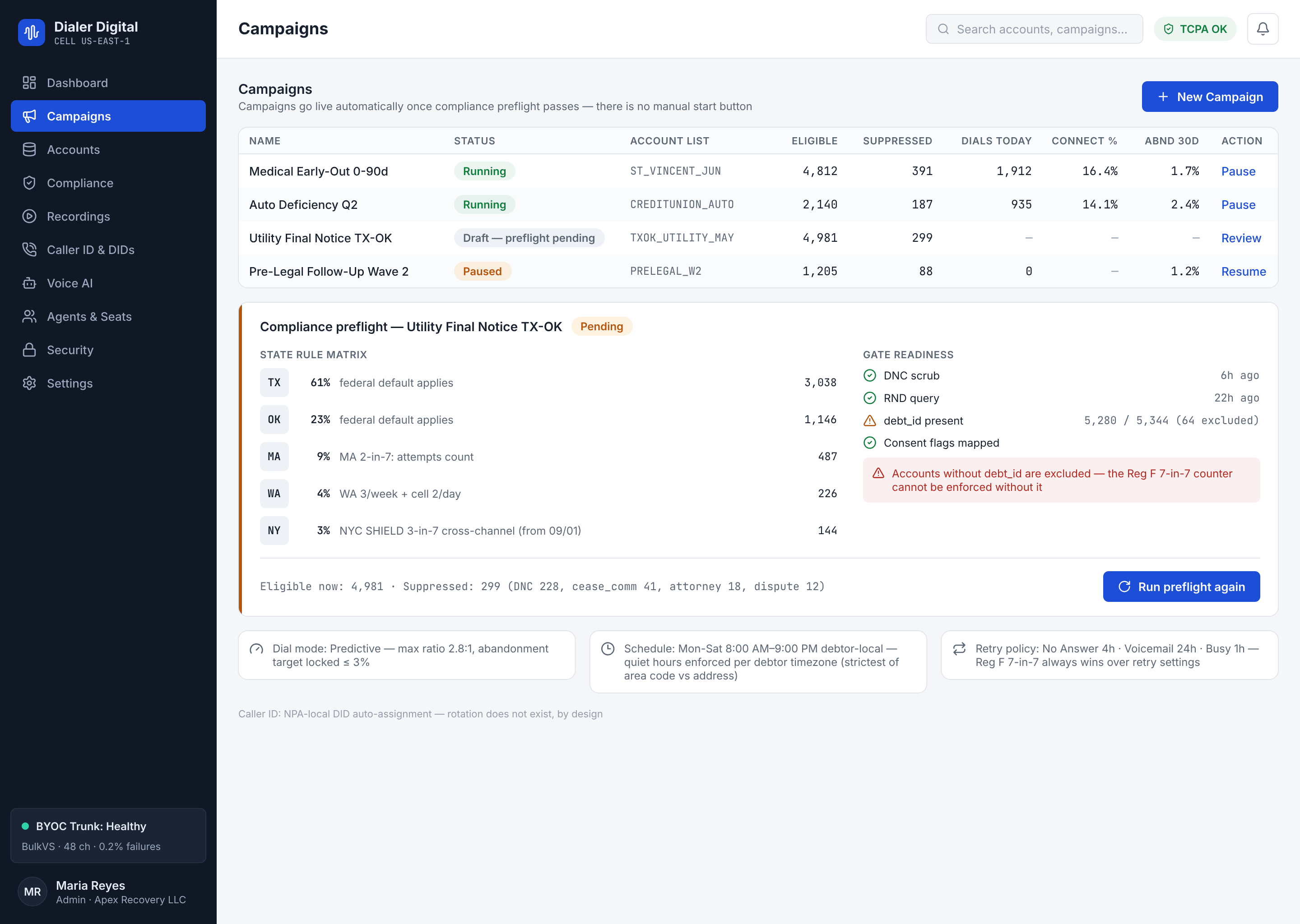
The lifecycle is explicit — nothing changes state on its own:
draft → running ⇄ paused → completed → archivedArchive takes a campaign off the active list and is offered only on a draft or completed campaign; it is terminal (read-only, no more dialing or editing) and you find it later under Show archived.
A newly created campaign stays in draft: configured but not dialing a single number until you start it.
archived is the end of the cycle, but the dashboard offers no action today to get there: from the list you only go as far as Completed.
2. Wizard · Step 1 — The basics (and the 3% lock)
Click New campaign:
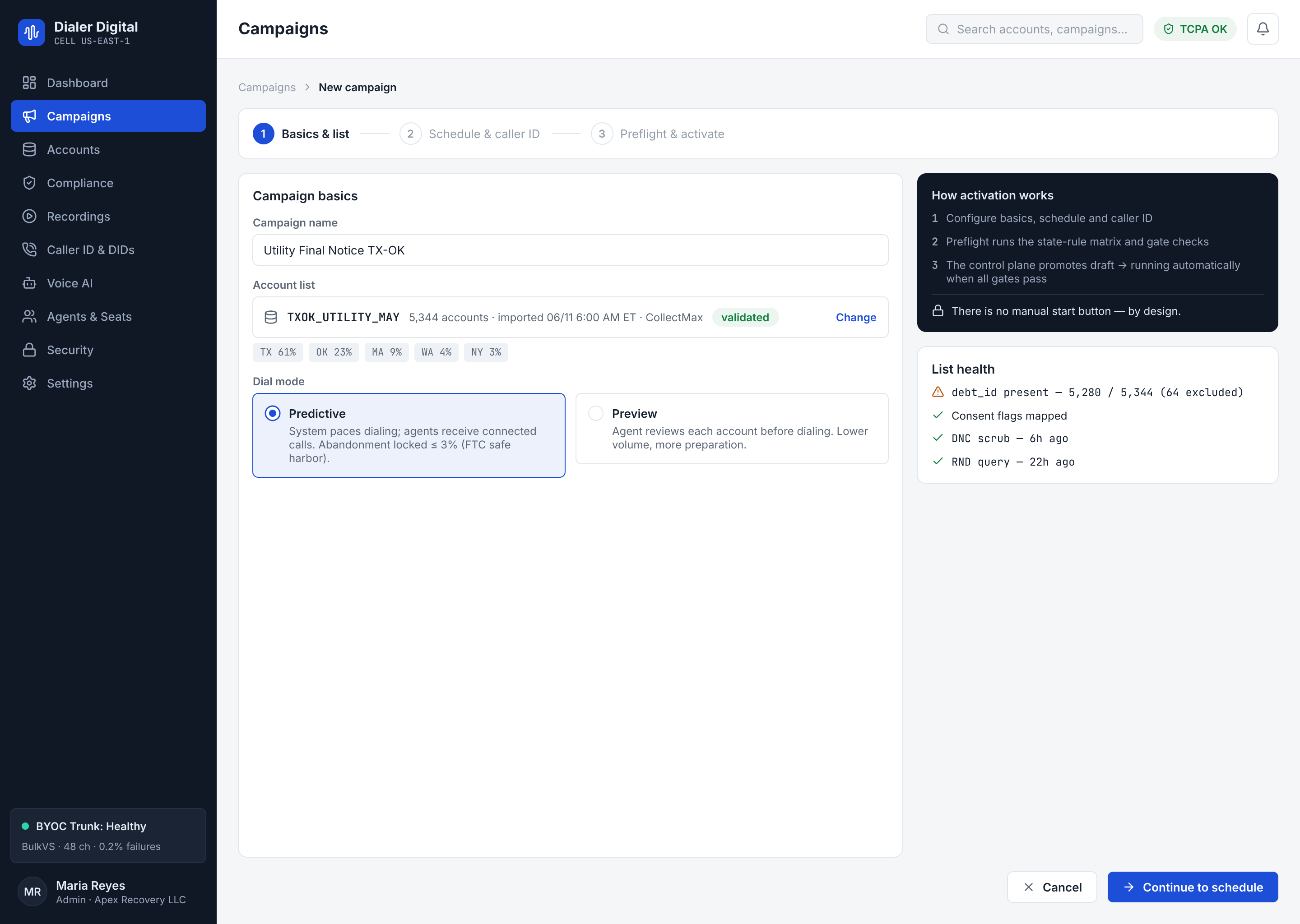
- Name — unique within your agency (if you repeat it, the system rejects it).
- Min/max dial ratio — how many calls the dialer launches per available agent (the initial values 1.0–2.8 are a good starting point). The engine moves on its own within that range.
- Abandonment threshold: 3% — locked. It is not editable. It is not a bug.
Why you cannot edit the 3%
3% is the FTC safe harbor for abandoned calls: above it, your agency is exposed. In other dialers that field is a preference someone raises "to get more contacts" — and the fine arrives months later. Here it is a hard-wired legal restriction: the wizard always sends it at 3% and the pacing engine slows the dial ratio on its own before crossing it. When your client (or their lawyer) asks, this is the answer: we cannot go over 3% even if we wanted to. That is part of what you sell.
3. Wizard · Step 2 — Schedule and caller ID
- Dialing window —
08:00–21:00by default. Careful: the hours law is evaluated in the consumer's time zone (the gates do that with the contact data, call by call); this window is your additional operational limit. - Default time zone — the zone assumed when a contact does not carry its own.
- Caller ID — the campaign's outbound number.
Per-day hours (optional)
Below the window is the Per-day hours checkbox, with the optional chip. It comes off: the campaign then uses its single window every day and nothing else is sent.
Turn it on and a grid appears with one row per day, Mon to Sun. It starts from the campaign window as it stands at that moment: Monday to Saturday open with those hours, Sunday closed. In each row you open or close the day with its checkbox and set a start and an end.
- It only narrows the campaign window. Each day is read in the same time zone as the campaign window, and it only dials where both are open. If a day goes partly outside, the row tells you only the overlap dials; if there is no overlap at all, it tells you that day dials nothing.
- A closed day does not dial. The row says "No calling". With the grid on there is no "unset" day that inherits the campaign window: a day without a window is closed.
- A day does not cross midnight. Start and end are
HH:MM(24h) and the end must be after the start. The hours after 00:00 belong to the next day, and its row decides them. - At least one open day. With every day closed the wizard does not move on: open at least one day, or turn per-day hours off. To dial nothing, pause the campaign.
- The step 3 summary shows the open days that will be saved (
calling_window_weekly [Mon Tue …]). If the platform refuses the per-day hours, the wizard says so with its message and nothing is saved.
It is your preference, not a legal rule
Per-day hours are your agency's preference. They are not a rule about days or holidays, and they replace none. The compliance gates, including permitted hours in the consumer's local time, still run on every call on their own, without reading your grid. The two add up: opening all of Sunday does not buy you an hour the hours gate closes, and a day you closed stays closed even if the gate would allow it (Module 4).
Account calling hours (Settings)
The per-day hours above belong to the campaign. Your agency, on the other hand, sets its operating hours once — e.g. Monday to Friday 9:00–20:00, Saturdays 9:00–14:00 — and expects no campaign to jump them, even if someone creates a campaign with a wider window. That is the account calling hours, in Settings:
- They only narrow. A call leaves only when the legal hours in the destination's zone, the campaign's window and the tenant hours are all open at once. A tenant schedule never widens anything: it cannot buy you an hour the campaign or the law already closes.
- A day without hours is closed. The grid runs Monday to Sunday, like the campaign's; a day you do not configure inherits nothing — it does not dial.
- Everyone sees them; an administrator changes them. Anyone on the account can read them; only an account administrator can save or remove them.
- With no schedule stored, calls follow only the legal hours and each campaign's window — exactly as always.
- An invalid schedule is rejected on save and the previous one is kept; and if a stored schedule cannot be evaluated at dial time, the call does not leave (it is blocked with its own reason, like any gate).
The retry card: what happens to an attempt with no contact
The same step 2 holds the Retry policy — by call outcome card. It decides what the system does when an attempt closes as no answer, busy or voicemail: when it dials that debt again, and how many times at most.
- It belongs to the whole account, not to this campaign. The card carries the whole account chip and saves with its own button, Save policy, separately from the campaign. Saving it does not create the campaign, and creating the campaign does not save the policy.
- Only an administrator can save it. The card is the account's retry rules: saving it, installing the recommended cadences or changing a campaign's own rules takes an administrator. A
memberlogin can read the card, but the save fails with403 role_forbidden. - If there are no active rules, the card tells you so: closing an attempt reschedules nothing. The Install the recommended cadences button installs the platform standard cadences (busy, no answer, voicemail and invalid number) with their figures; you then adjust them on the same card.
- Each row (no answer, busy and voicemail) is switched on with its checkbox and carries four figures:
| Field | What it is | Bounds |
|---|---|---|
| First retry (min) | How long to wait before the first retry. | Between 0 and 43,200 min (30 days), on whole seconds. |
| Multiplier per attempt | How much the wait grows on each following attempt. | Between 1 and 10. |
| Longest wait (min) | The ceiling on the wait, however much it grows. | Cannot be less than the first retry. |
| Max attempts | How many attempts the policy tolerates. | Whole number, between 1 and 100. |
- Under each row you see what is already saved ("Saved: first retry after…"), so you can compare before changing anything.
- Voicemail (
answered_machine) is an editable row like the others. A call where answering-machine detection hears a machine closes as voicemail in every campaign type, the predictive dialer included, and that row's rule decides whether it is rescheduled and when. If you have no rule of your own, the row tells you what the platform default does: the account is not offered again until 08:00 the next day, consumer local time. (The agent's Voicemail button is a different code; see Module 5.)
Max attempts is not a legal ceiling
Max attempts counts every attempt on the debt, whatever its outcome; once the max is reached, an attempt with that outcome closes the debt instead of rescheduling it. But it does not replace the law: Reg F 7-in-7 always wins over retry settings, it is checked on every dial and it counts per debt, not per phone number. A policy with 20 attempts does not get a single call the 7-in-7 does not allow.
4. Wizard · Step 3 — Preflight, list health and activation
- Review the summary: it is exactly what will be saved — name, ratios, window, zone, and the 3% (locked, there it is again).
- Pick one of the two buttons. Both create the campaign in
draftand neither dials anything:- Save as draft creates the campaign and goes back to the list.
- Create draft & import list → creates the campaign and stays in the wizard for three more steps: import its list, check its health and, as a separate step, activate it.
Import the draft's list
You pick a CSV; columns are detected automatically and every account is attached to this draft. If no column is recognised as the account id (external_ref, the Reg F key), nothing is imported from here and the wizard sends you to Debts. To map columns by hand or reuse a saved template, import from Accounts with this campaign selected (Module 2).
Check the list health
Check list health runs the compliance preflight on the draft: the same engine and stores dialing uses, in dry-run. It dials nothing and starts nothing. The panel tells you how many of the four signals block ("no signal blocks" or "N of 4 signals block") and, for each one, how many leads it blocks and how many could not be verified:
| Signal | What it counts |
|---|---|
| Consent | Leads the consent gate would refuse. |
| Resolvable state | Leads whose state does not resolve to a state code: state rules cannot be applied to them. |
| DNC | Leads on a DNC list, or that cannot be checked because a list has no fresh snapshot. Underneath you see the age of each list (Federal DNC, State DNC lists, Internal global DNC) and of each state registry, against its maximum. |
| RND (reassigned numbers) | Leads the reassigned-numbers check refuses or cannot answer. Underneath you see the declared provider. |
Each signal reads the same leads on its own, so one lead can count under several signals: the four rows do not add up.
"Not verifiable" is a block, not a warning
Whatever the platform cannot check counts as blocked, never as healthy: a DNC list whose snapshot is stale or absent, an RND provider that is not declared, a state that does not resolve. The stub RND provider is painted as a block too, because it queries no registry ("stub — verifies nothing"). In each signal, the blocked count already includes the not-verifiable ones. And if the server does not report list health, every signal shows "not reported — blocks".
If the list is large, the preflight only evaluates up to its per-call limit. The panel says so ("Only the first N of M leads were evaluated") and the counts then cover those leads only, not the whole list.
Activate: a separate step
Activate campaign sets the campaign going. It unlocks once you have checked the list health for the list as it is now: if you import again, the previous check is cleared and has to run again. Keep as draft leaves it in draft, dialing nothing.
List health does not replace compliance at dial time
It is a read-ahead, not a permission. What it reports does not stop you from activating, and a "no signal blocks" lets no call through: on every dial the gates check each lead again, and every blocked lead is refused again (Module 4). If a signal blocks, the wizard warns you that those leads will be refused at every dial while this stays as it is.
Demo account
On a demo account, Activate campaign is disabled ("This is a demo account and it never originates calls: the campaign stays a draft."): the campaign stays a draft and dials nothing. Details in Module 1. And if an activated campaign on a real account does not dial, the row says why: Module 5.
From the list you can Pause (calls in progress end normally; no new ones are launched), Resume and Stop. Stop asks first and is terminal: the campaign ends Completed (completed) and cannot be resumed; afterwards you can Archive it to take it off the active list. An invalid transition — e.g. starting a completed one — is rejected with a conflict, it does not "fix itself". If you archive and the campaign changed state meanwhile, the dashboard tells you and reloads the list.
5. What to watch on the first day
- On the dashboard: the live abandonment bar against the 3% ceiling, and the campaign's row in Abandonment — 30 days per campaign, the rate the rules measure.
- On the list:
dialed,blocked(attempts that compliance blocked — that is good: it worked for you),in flight. - If a campaign is running and not dialing, look at its row: when the brake is on the whole account — plan not active, prepaid balance or credit used up, the monthly Voice AI budget, the spending limit before identity verification (KYC), or the calls-per-second or simultaneous-call limits — the row says which one and what to do, with the Check Billing & Plan link when it is a billing brake. It is not a compliance block: the campaign dials again on its own once the brake lifts.
- If abandonment creeps toward 3%, the engine is already slowing down on its own. There is no knob you have to touch at 7pm.
6. Reusable lists: one portfolio, several campaigns
If the same portfolio has to be worked in a second campaign (another script, other hours, another team), do not import it into that second campaign: import it into a reusable list and associate that list with every campaign that should work it. An account is still one account: it is never copied into a campaign.
Create the list and import accounts into it once
- In Debts, the Reusable lists → button opens the list manager.
- Under New list, give it a List name and click Create list. The name is unique in your account: a repeated one is refused with the server's message. The list starts empty.
- On its row, Import into this list takes you to the same Debts importer (Module 2) — same mapping, same E.164 report, same dedupe — with the list as the destination. Those accounts enter the list and no campaign is set on them directly. Re-importing the same file does not add them twice.
The table's Accounts column is the list's size counted when it is read, not a live counter: the screen reads it again after every change. Next to it you see the Associated campaigns.
Associate it with a campaign, or dissociate it
Association is done from the campaign, not from the list: in Campaigns, each campaign's Lists action.
- Associate: every account of the list, the ones there now and the ones you import later, enters that campaign from its next tick. You can associate the same list with several campaigns.
- Dissociate asks for confirmation: the accounts leave that campaign from its next tick, unless they are in it another way (their own campaign or another list). Neither the accounts nor the list are changed.
Removing an account from the list
Importing never takes a debt out of a list or a campaign. To take them out: under Debts → Reusable lists (/accounts/lists), the Members action on the list's row reads them —500 per page, with Read more members to continue— and shows each with its external reference and when it Entered the list. Search by external reference filters only what has been read; load more to widen it. Tick the ones you want (or Select every visible member) and press Take out of the list (N): the dashboard asks first and tells you which campaigns will stop working them through that list. The debts are not deleted: they only stop being members. There is no UUID to type any more. The same by API is GET and DELETE /v1/debt-lists/{id}/members (batches of 500; API guide). What still does not exist is a button to undo a whole import: the platform does not record which import put each debt in, so it is undone by reading the external references and taking them out in batches.
What a shared list does not change
An account in three campaigns still has ONE Reg F cap
The 7-in-7 counter is per account (per external_ref), and every campaign working it counts against the same cap: a second campaign never adds a single call beyond it. Even if two campaigns try to dial the same account at the same instant, the platform reads the counter and records the attempt under one lock per account, so the eighth call does not go out.
- A list is not a legal rule nor a do-not-call list. The compliance gates run before every call, whatever list the account is in (Module 4).
- What belongs to the account crosses campaigns. An account with a call in progress in one campaign is not offered in another. And if one campaign's retry policy parks it ("no answer, retry in 2 h"), the other campaign does not dial it either while that lasts: a short retry in one campaign delays the other.
- Callbacks on a shared account. The callback the agent books from the call carries that call's campaign. If you book it through the API (
POST /v1/callbacks) on an account that is in more than one campaign, you must sendcampaign_id: omitting it or sendingnullanswers422("campaign_id is required: the debt is in more than one campaign"). The platform does not guess the campaign. With a single campaign, that one is the default. - Rewind. An account's state belongs to the account, not to a campaign: one campaign's rewind does not reopen a closed account that another campaign also holds. The rewind result tells you how many stayed closed for that reason (Module 5).
Test yourself
- Who decides to slow the pace when abandonment gets close to 3%: the supervisor or the engine?
- You created the campaign with the wizard. Is it dialing already?
- Your client asks you to "raise abandonment to 5% this week to sweep the portfolio". What do you answer?
- List health says "no signal blocks". Does compliance still need to check every call?
- Your client wants to call on Sundays from 07:00 to 23:00, so in per-day hours you open Sunday with those hours. Does it dial at those hours?
- The Q3 portfolio is in a list associated with two campaigns. One account already has 6 calls in the last 7 days across both. How many more can it get in that same window?
Answers
- The engine: pacing is regulated automatically within the dial ratio range so as not to cross the ceiling.
- No. It stays in
draft; dialing requires the separate Activate campaign step. - That it cannot be done — 3% is the FTC safe harbor and it is hard-wired as a restriction, not a preference. It is exactly the protection they hire you for.
- Yes. List health is a dry-run read-ahead; on every dial the gates check each lead again and refuse the ones that block.
- No. Per-day hours only narrow: Sunday dials only where it overlaps the campaign window, and on top of that the hours gate decides every call in the consumer's local time. It is your preference, not a permission.
- At most one. The 7-in-7 cap is per account and both campaigns count against the same one: the second campaign adds no calls beyond it. And it may be none: if any of those calls was a conversation with the consumer, Reg F post-contact allows none in the 7 days after that conversation (Module 4).