Appearance
Module 5 · Run the day
Leer en español: Módulo 5 · Opera el día.
Goal: run a full day on the floor: agents online, live monitor, callbacks and promises to pay captured properly, and the rewind ritual at close. Time: ~10 minutes · Before: Module 4.
1. The morning: agents online
Each collector has a seat with their SIP extension (their softphone). At the start of the shift, the agent checks in with their extension and their seat moves to available — from that moment the dialer bridges answered calls to them.
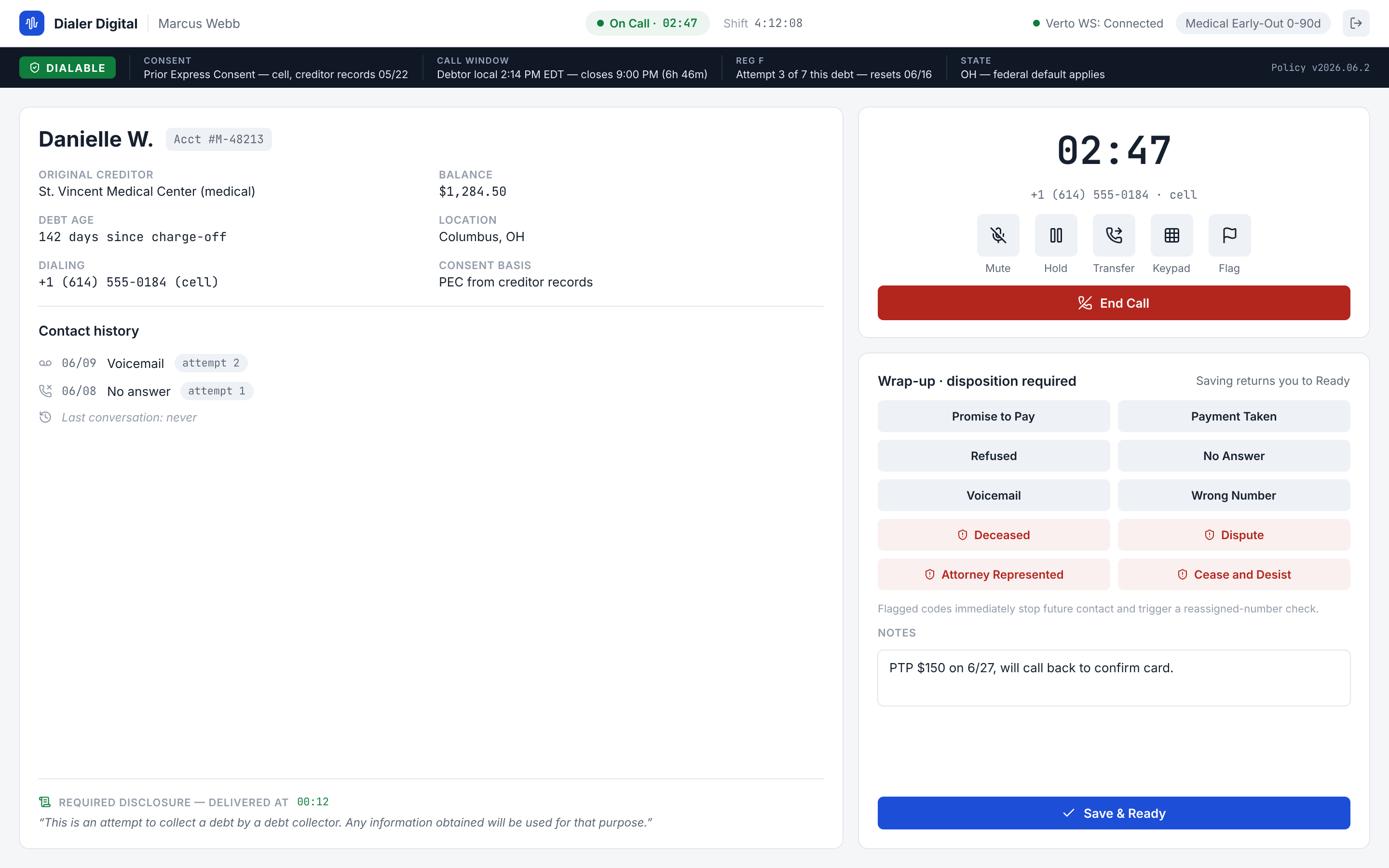
The states you will see on the floor: offline → available → ringing → on_call → back to available. Check-out only proceeds from available — the system does not let you pull a seat that is on a call (on purpose: no hanging up on the consumer because of a logout).
2. The live monitor
Agents → Live Monitor is your supervision view:
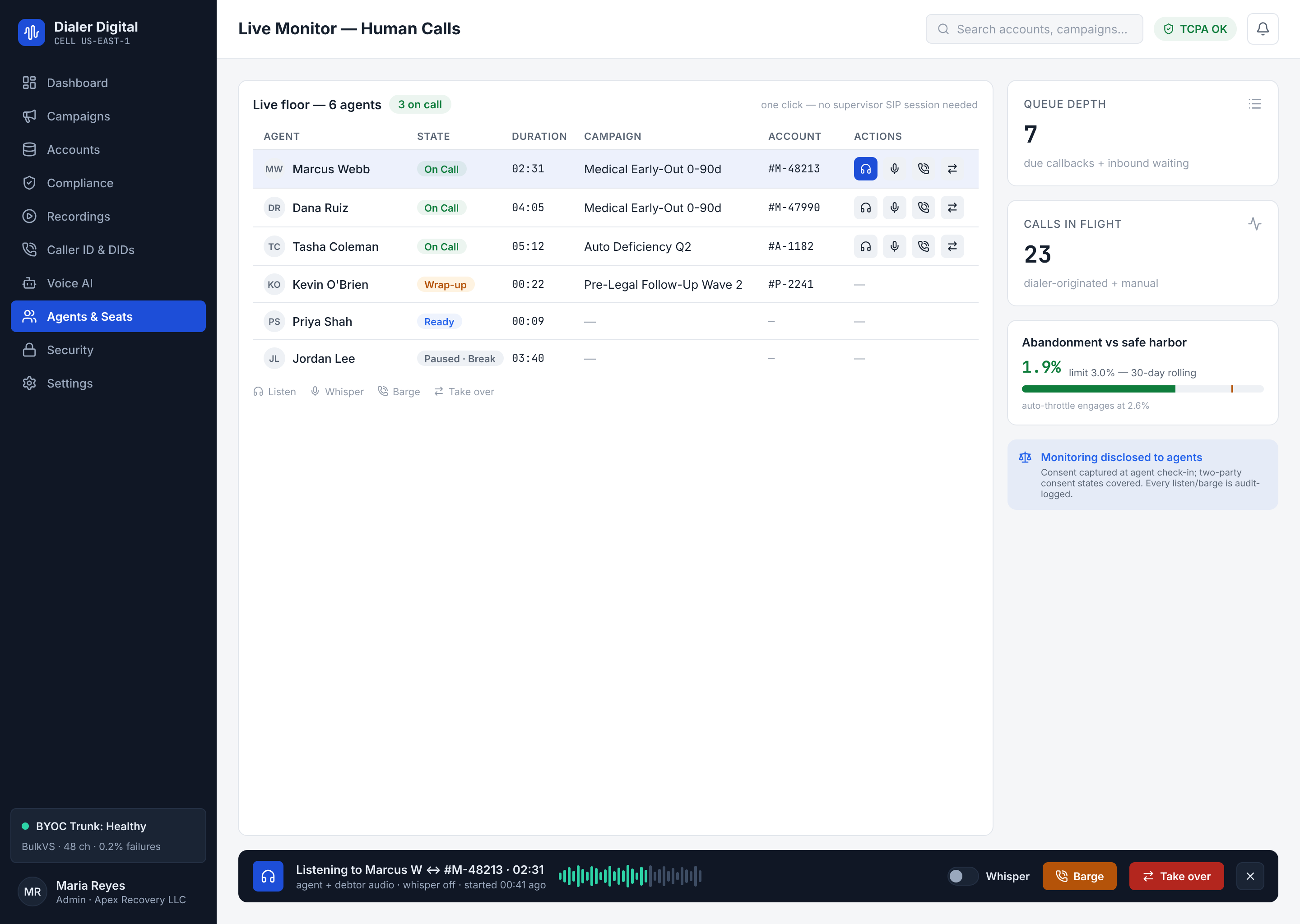
- The seat grid moves on its own (push, no refreshing): who is available, who is ringing, who is on a call and for how long.
- The right rail: overdue callbacks in the queue, calls in flight and the abandonment gauge against the 3% ceiling. The gauge reads "Live abandonment — worst campaign": it shows the worst campaign of the moment, with its name, not the aggregate. What the rules measure is still the 30-day per-campaign card (Module 1, point 3).
- Listen / whisper / barge / take-over are active: the four supervision actions work today and each one leaves its audit row. How to use them, in Module 8. If the button can be pressed, it is because it works — that is the rule.
3. The wrap-up: typed dispositions (and a real PTP)
When the call ends, the collector records the outcome. Here is the difference from the dialer you know:
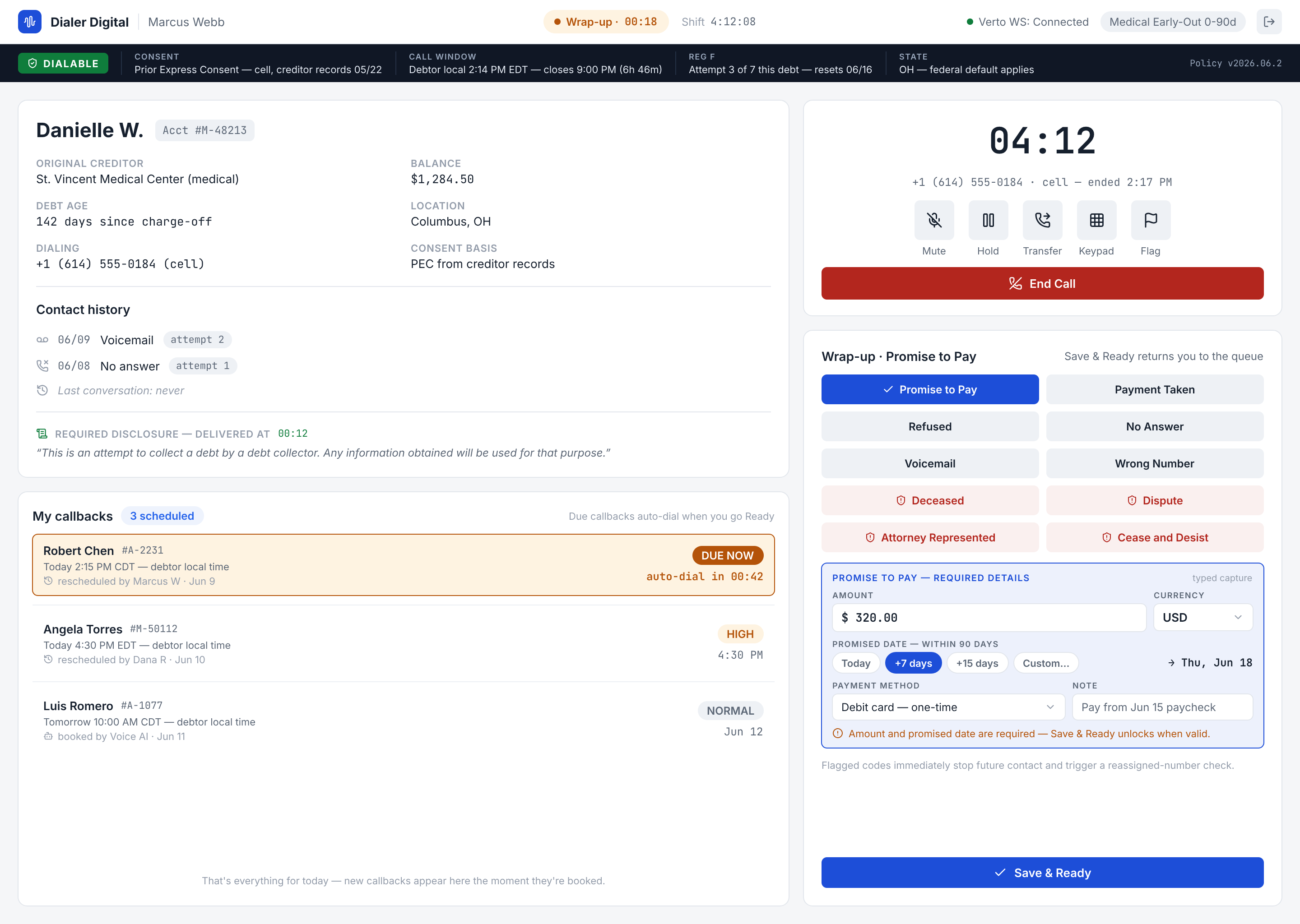
- Promise to pay (PTP): the system requires the terms — amount (greater than zero), currency and date (in the future, at most 90 days). A "promise" without amount or date is rejected: there is no word-of-mouth PTP that nobody can collect on later. The promise and the disposition are saved together, as a single operation — either both go in, or neither does.
- Callback (the consumer asks to be called later): it is scheduled with at least 10 minutes of lead time and only to a phone that is already a contact of that account — the gates need the line and time-zone data to re-evaluate the call back.
- A correction is written as a new row on top of the original record (Module 4): the full history remains.
Four dispositions that stop the contact by themselves
Four codes are not just a note on the call: choosing one writes the stop on the platform, in the same operation as the disposition — either both are saved, or neither is. It does not depend on any rule your account set up for that code, and you do not need to tell a supervisor: the next batch no longer dials that person (with Do not call me again, that number).
| Disposition (as the console shows it) | Code | Consumer cease | Number on your account's do-not-call list |
|---|---|---|---|
| Cease and Desist | cease_and_desist | Yes | Yes |
| Attorney Represented | attorney_represented | Yes | Yes |
| Deceased | deceased | Yes | Yes |
| Do not call me again | do_not_call | No | Yes |
- Cease means every voice call and SMS to that consumer is blocked, on all their debts.
attorney_representedanddeceasedcease by default while counsel decides; blocking is the safe side, and lifting a block is an account-administrator act, with its audit trail. - Do not call me again lists only the number: the consumer's other numbers are not asked for, so the consumer is not ceased.
- The number is the one dialed on an outbound call and the caller's on an inbound one (not your account's line).
- Choosing the same disposition twice writes nothing twice. Your account's retry rules still run afterwards, but they can never relax what was written. If writing the stop fails, the request fails and nothing is added, so type it again. Two exceptions: a call with no consumer behind it only lists the number, with no cease; and a call with neither a consumer nor a number writes no stop at all while the disposition is still recorded (the platform only logs an error).
disputeis only recorded on the call; it writes no stop.
Wrap up with the keyboard (and turn the shortcuts off if they get in the way)
The disposition picker is a list of eleven options with a single Tab stop: you enter with Tab, move with the arrow keys (Home and End jump to the first and last) and choose with Space or Enter. The stop follows the chosen option. A screen reader announces every choice as “Disposition: …”, whether it came from a click or the keyboard.
- Bare digit (
1–9and0) andN: pick the disposition on that key.Nis Do not call me again, the eleventh option (every digit is taken). They are on by default. Alt+digit (Alt+1…Alt+0) andAlt+N: pick the same one and always work, also with the setting off.- The setting that turns them off: Settings → Keyboard shortcuts — “Single-key shortcuts (1–9 and 0 in the wrap-up, / for search)”. The console explains it: “On by default. Turn them off if a stray key press picks an option you did not mean to. Alt+1…Alt+0 and Alt+/ work either way. This is saved per agent, in this browser.” Turn it off if you type while you talk and a stray digit has picked the wrong outcome.
After the disposition: the retry policy
The agent's disposition does not stop at the record: once saved, it goes to the retry policy (the card from Module 3 edits your account's). If there is an active rule for that outcome, the rule decides when the debt is dialed again, or closes it if it already reached its max attempts: the rule of that attempt's campaign if that campaign has its own for that code, and otherwise your account's. If there is no rule for that outcome, nothing changes.
What the policy does not do, no matter what:
- It does not bring a debt forward: it can only postpone or close it. And the wait is counted from the attempt (the moment the call closed), not from the moment the agent saved: repeating the disposition later gives the same result.
- It does not touch a debt that is closed, paid or in dispute: it stays as it is.
- It does not reschedule a debt with a pending callback — the callback the consumer asked for rules (the policy can still close it).
- It does not undo the disposition or the promise if something fails while applying it: what the agent recorded stays recorded.
- It does not skip Reg F: every dial of the new pass goes through the 7-in-7 gate again.
The agent's codes are its own
The wizard card edits the rules for the machine outcomes (no answer, busy). The agent's dispositions have their own codes: the No Answer button in the call close is recorded as no_answer_agent, not as the machine's no_answer. A rule only applies to the exact code it was written for, so a rule for an agent disposition is written today through the disposition rules API (Developers), not from the card.
4. Callbacks and promises during the day
Callbacks holds the day's queue, ordered by urgency: overdue → due soon → upcoming.
- The dialer works the queue on its own: overdue callbacks are dialed before fresh accounts, and the system marks them completed when the attempt is recorded. Your job is queue hygiene (cancelling the ones that no longer apply), not dialing them by hand.
- The promises tab is your collection pipeline: each PTP is born
pendingand you resolve it tokept(paid),broken(did not pay) orcancelled. Resolving them is what feeds your kept rate in Module 6. - When a collector captures a PTP, the owner dashboard reflects it instantly — push, like everything else.
5. The rewind ritual
At the end of the day (or the week) the campaign runs out of fresh accounts, but there is portfolio that deserves another pass: the morning's no-answers, the busies. That is what Rewind is for:
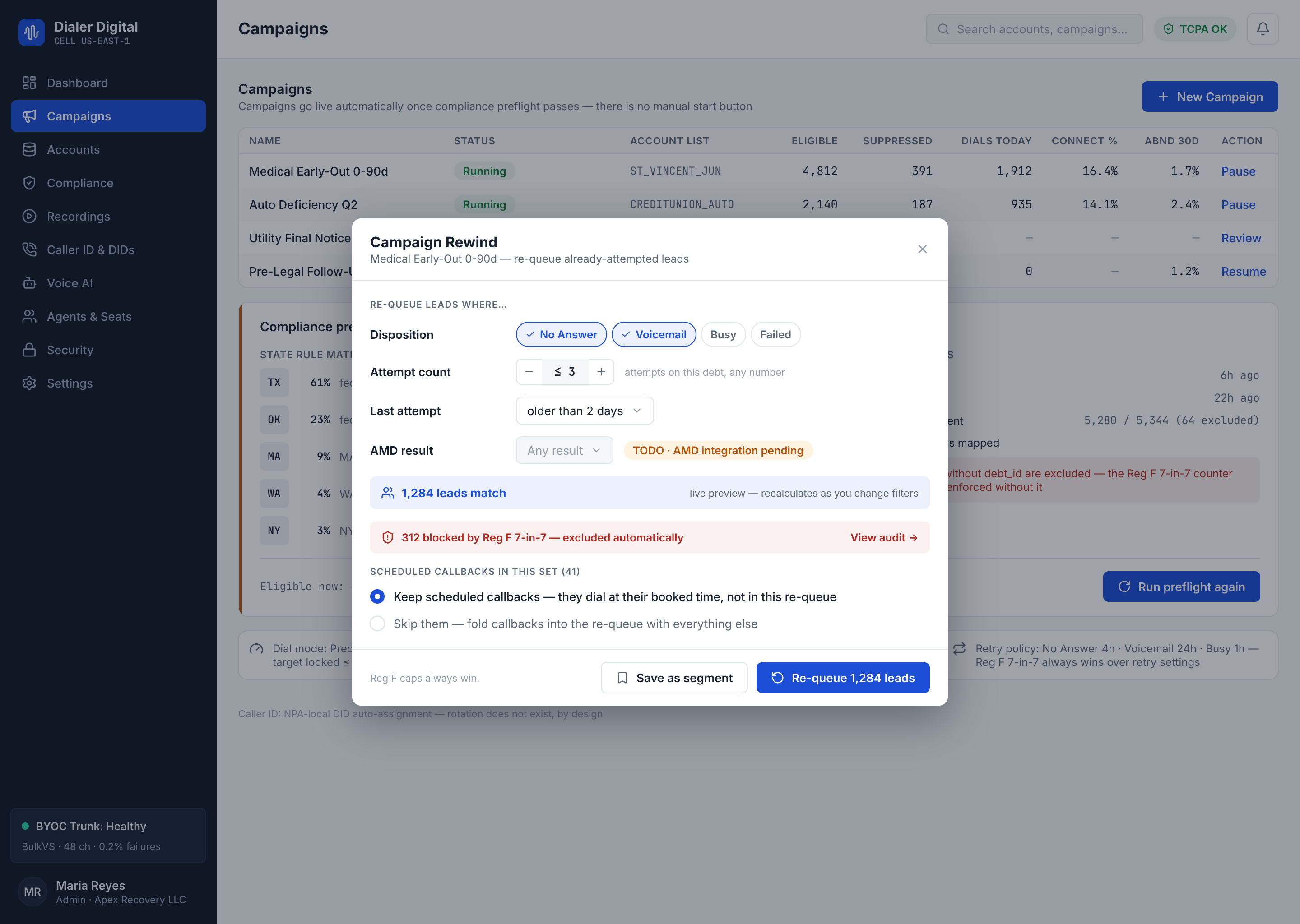
The ritual, in order:
- Filter: which dispositions come back (e.g.
no_answer,busy), maximum previous attempts, and that the last attempt is more than X days old. - Read the preview — always before running it. It tells you how many accounts match and, in the red band, how many are excluded by compliance (Reg F · DNC · hours) at this moment. The preview dials nothing: it is a dry run.
- Decide what happens to the scheduled callbacks of those accounts: keep them (default) or cancel them.
- Run it. The accounts go back to the queue as if they were fresh.
Three protections you do not have to remember — they are automatic:
- Accounts that are paid, settled or in dispute never come back, no matter the filter.
- The history is not touched: rewind does not delete attempts or reset Reg F counters. The gates re-evaluate every call of the new pass.
- Even if the preview said "passes", the gate decides again at the moment of dialing.
Filter by AMD result
The AMD result filter lets you rewind by what answering machine detection heard on the attempt: Human, Machine, Not sure and Unspecified. Select one or several; they are sent to the platform as amd_verdicts, like every other filter, and the live preview reflects them. With no selection, the filter is not sent.
Save a segment for the next rewind
If you repeat the same rewind every week (e.g. "no answer + voicemail, 3+ attempts, last 7 days"), save it as a segment instead of rebuilding it by hand:
- A segment is a named set of filters, per tenant. It is not a frozen list of accounts: using it re-evaluates it against that moment's data, so no second copy of your data is stored.
- Save: with your filters set, name it and press Save as segment. An invalid filter is rejected on save (422), by the same validator the rewind uses.
- Load: pick one under Load segment and its filters are copied into the modal; the preview re-evaluates it against current data. If a segment uses filters this screen cannot show, it tells you instead of loading half of it.
- Editing or retiring a segment happens through the API (
PATCH/retireon/v1/rewind-segments); the modal only saves and loads.
Campaigns the platform stops by itself
Besides the stops a person makes (pause, stop), the platform can take a campaign off the air by itself. You will see it as a state chip in the campaign list, and you do not set it: the platform writes it.
- Balance suspended (
suspended_balance, red chip). Your prepaid balance reached the suspension floor, so the campaign leaves the air. It returns torunningon its own when the balance recovers; no call, no operator. To get out of it, top up the balance (Module 7). The platform did not let calls go out that the money check would have refused anyway. - Exhausted (
exhausted, amber chip, «The feed is exhausted; no retries are pending.»). The campaign has a list, but nobody in it can be dialed now, nothing is parked for a later retry and no callback is pending. A campaign with a retry scheduled for later is never marked exhausted. It does not resume by itself: once you load more accounts or after a rewind, start it again (from the campaign list, orPOST /v1/campaigns/{id}/start) and it goes back torunning.
Two platform switches govern these stops: campaign_balance_suspension_enabled (the balance suspension) and campaign_auto_stop_exhausted_enabled (the automatic stop of an exhausted campaign). They are not in your console and you do not change them; this lesson does not promise that they are on for your account, so if a campaign you expected to stop keeps running, or stops when you did not expect it, ask support.
Why a running campaign is not dialing
If a voice campaign is running but no call goes out, the row in the campaign list tells you the cause in one sentence and, when there is something you can do, a link. It shows only while the campaign is running, and clears by itself when a later cycle dials again. The caller-ID causes are these; the sentence is the console's literal one:
Cause (pool_unavailable_reason) | What the row says | What to do |
|---|---|---|
zero_active_dids | "Not dialing: none of the numbers in this campaign's group is active. Reactivate one or add another and dialing resumes on the next cycle." | Open the DID registry link: reactivate a number or add another (Module 9). |
did_unverified | "Not dialing: your numbers are not verified yet and the platform requires it. Ask your account manager to verify them." | No link: the platform does the verification, not the console. Ask your account manager. |
resolver_failed | "Not dialing: the number registry could not be read, so no call goes out without a caller ID. It retries on its own; if it lasts, tell your support contact." | Wait for the next cycle; if it lasts, support. |
reuse_cap_exhausted | "Not dialing: every number of the campaign has already been shown as many times today as the daily limit allows. Add more numbers or wait for tomorrow." | Open the DID registry link: add numbers, or wait for the next day. |
reuse_cap_failed | "Not dialing: the daily use count of the numbers could not be read, so no call goes out. It retries on its own; if it lasts, tell your support contact." | Wait for the next cycle; if it lasts, support. |
no_caller_id_source | "Not dialing: the campaign has no caller ID assigned. Give it a number or a group of numbers." | Edit the campaign and give it a number or a group (Module 3). |
And one cause that is about the shift, not the number: in the campaign types that require an agent (predictive, progressive, preview and manual), if the cycles' no_agent_seat counter keeps rising, the row says "Not dialing: no agent is in Ready. This campaign only dials when an agent is free to take the call." It has no link: an agent has to check in and go Ready (Module 20).
If your console is older than the platform and receives a caller-ID cause it does not know, it does not show the internal code: it says, generically, "Not dialing: the campaign has no usable caller ID, for a reason this version of the console cannot describe. Check the numbers of its group; if it lasts, tell your support contact.", with the link to the DID registry.
A demo account has its own row: "Not dialing: this is a demo account and it never originates calls. It does not clear on its own: dialing for real needs a real account." (see Module 1).
Test yourself
- A collector wants to record "promises to pay" without amount or date. What happens?
- Who dials the overdue callbacks: the collector or the dialer?
- You rewound 200
no_answeraccounts. Were their 7-in-7 counters reset?
Answers
- The system rejects it: a PTP requires amount, currency and date (at most 90 days). No terms, no promise.
- The dialer: it works overdue callbacks before fresh accounts and completes them on its own. The human only does queue hygiene.
- No. Rewind re-queues, but the record is untouchable and Reg F keeps counting — the gates re-evaluate every attempt of the new pass.