Appearance
Module 4 · Compliance that defends you
Leer en español: Módulo 4 · Compliance que te defiende.
Goal: understand the gates that block before dialing, read the block reasons, and know exactly what to show a lawyer or an examiner. Time: ~8 minutes · Before: Module 3.
This is not legal advice
This module explains how the platform works. Always confirm your compliance posture with your own lawyer.
1. The difference: blocking vs. reporting
Almost every dialer gives you a report of violations — after you called. Here the model is inverted and it is fail-closed: every attempt goes through a chain of gates before it is originated, and if a gate says no — or if the gate cannot decide for lack of data — the call never exists. When in doubt, it does not dial.
The gates that run on every attempt:
| Gate | Rule | Where the data comes from |
|---|---|---|
| Reg F 7-in-7 | At most 7 attempts in 7 consecutive days per debt. | The counter counts by external ref (the key from Module 2). |
| Reg F post-contact | A 7-day wait after a telephone conversation about the debt, with an agent or with the AI. | The last-conversation date that the system itself records. |
| Permitted hours | 8:00–21:00 in the consumer's local time. | Time zone and state of the contact imported with your portfolio. |
| DNC | Do-not-call lists. | Registries checked at the moment of the decision. |
That is why the mapping in Module 2 was not red tape: without time zone or state, the hours gate cannot decide in favor — and it does not dial.
Your campaign window and its per-day hours are something else: your agency's preferences, and they only narrow. They add up with the hours gate, which does not read them. Neither one opens an hour the gate closes, and a day you closed does not dial even if the gate would allow it. Nor are they a rule about days or holidays.
Artificial-voice campaigns: no opt-out key, no dialing
Synthesized-voice campaigns — tts_blast, tts_ivr, ivr_cascade and survey — carry two more rules. The artificial-voice disclosure you stored for your account plays at the start of every call, before your script; without a valid one, the campaign does not dial. And the campaign needs an opt-out key (optout_digit): without it, every attempt is blocked as tenant_policy and lands in your evidence. The consumer must hear which key opts them out: write that sentence in your disclosure, right after the call identifies itself, with the marker {optout_digit} where the key goes — for example "This is an automated call from Acme Collections. Press {optout_digit} to stop receiving these calls." Each campaign puts its own key in place of the marker. Do not type the key itself: a disclosure without the marker is saved, but no TTS, IVR or survey campaign dials with it. Voice AI campaigns do not use a key: the consumer opts out by saying so in the conversation. Details in the API reference. Saving the disclosure takes an administrator: a member login gets 403 role_forbidden.
Voicemail, composed only. These same campaigns, with answering-machine detection, can leave a voicemail, and only one the platform composes: your disclosure (with the campaign's key), then your text with the marker {optout_number} where your toll-free opt-out number goes, read digit by digit. That number must be an active opt-out route of your own account (Module 10): whoever calls it back lands on your do-not-call list. If any piece is missing — detection, the number, the marker, or the route was deactivated — no message is left and the machine is hung up on. Details in the API reference.
Voice AI campaigns
- The AI disclosure is ready before the first call. The platform turns it into audio before dialing, so it is the first thing the consumer hears; until it is ready, the campaign does not dial. If you edit the disclosure, the campaign waits for the new audio.
- There is a capacity ceiling. The platform does not open more AI sessions than it can hold; when they are all in use, the campaign waits and its row says the account has a brake in force (
ai_capacity). It continues on its own as soon as an AI call ends. - A call the AI cannot take does not hang up in silence. If the AI session is refused for capacity and no agent takes the call, the consumer hears the abandoned-call identification message and the call ends; it counts as abandoned.
- No free agent, the conversation can stay with the AI instead of ending in a fixed apology. That call does not count as abandoned: the 30-day abandonment report lists it apart.
- A conversation with the AI counts for Reg F. An answered AI call that detection did not flag as a machine starts the 7-day wait after a conversation, just like a call with an agent: that debt is not dialed again inside the window. When in doubt it blocks: a failed handoff or an AI session that dropped also start it.
Details in the API reference.
2. Where you see the blocks
- On the dashboard and on each campaign: the blocked counter — attempts the engine stopped. A high
blockedis not a failure; it is the system working. If it looks too high to you, it is almost always a portfolio that has already been worked a lot (full 7-in-7 counters) or incomplete contact data. - In the rewind preview you will see the
excluded_by_complianceband: accounts the engine would block right now.
Consent you hold, and opt-outs
The consent gate reads the consent recorded for each number. Besides the consumer answering START by SMS, an account administrator (or a dd_ key) can record the consent the agency already holds, with its proof: where it was obtained and where the evidence lives (a recording, a signed form, a URL). No proof, no consent. The platform stores that reference as given; it does not open it or verify it, and a member login cannot write it. The route, the CSV import and their limits are in the API reference. A consent does not open the other gates: do-not-call, hours and Reg F keep deciding every call. The minimum proof the platform requires and how a declared landline is treated are still undecided; do not take them as final.
And the other direction: a STOP that arrives through an SMS provider of the whole account is an opt-out for every sede of the account; one that arrives through a provider of one sede stays with that sede. It never crosses to another account (Module 16). A START by SMS gives SMS consent back, but it only lifts the opt-out that an SMS STOP wrote: one made by voice, keypress, inbound call or your CSV stays. SMS also honours REVOKE, OPT OUT, STOP ALL and short phrases like "please stop" (Module 16).
Two more opt-outs write themselves. When an agent types Cease and Desist, Attorney Represented, Deceased or Do not call me again at wrap-up, the platform writes the cease and/or the do-not-call listing in the same operation (Module 5). And when a consumer presses the opt-out key on an outbound call (the optout_digit, or an optout action in the call menu), the opt-out is recorded with the reason outbound_dtmf_optout, so your evidence tells a keypress from an SMS STOP; the call is hung up either way. If the write fails, the platform logs it and retries up to 3 times (after 1, 5 and 30 seconds) while the call still hangs up. The retry lives on that server: if it restarts in that window the pending opt-out is lost and optout_lost does not count it (it only counts retries that ran out); what remains is the error logged on the first failure.
3. The audit trail: frozen evidence
The campaign filter on this screen is a searchable picker that hides archived and completed campaigns until you tick Include inactive and archived: see how the pickers work.
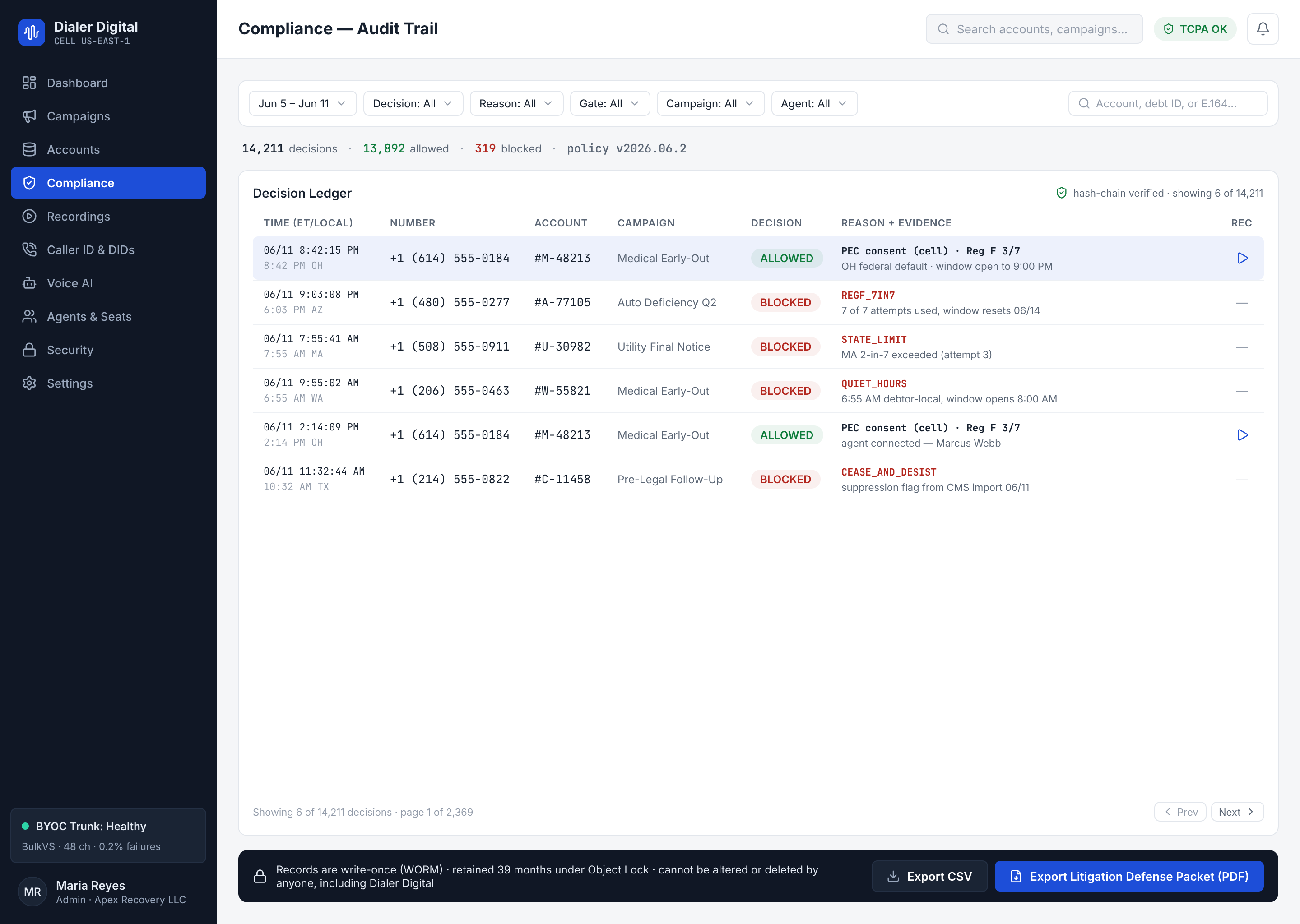
Every attempt stays in an append-only record (it is only added to, never edited or deleted) with a frozen compliance snapshot: what the platform knew at the instant it allowed that call — counters, the consumer's local time, the result of the checks.
Two properties make this hold up in a dispute:
- Immutable. If a collector corrects the disposition afterwards, the correction is a new row pointing to the original. The full history is always visible; nothing is overwritten.
- Reproducible. The snapshot freezes the inputs of the decision. Even if the data changes later (the consumer went on DNC the following week), you can prove what was known that day at that time.
A request to erase one person. "Append-only" does not mean the platform can never honor a privacy request. Through POST /v1/privacy/erasure-requests (REST API) the platform can first simulate the erasure of one person (what would be anonymized, what must be kept and until when) and, once the platform operator has turned the execution on (it is off by default), anonymize them: the rows stay, only what identifies the person goes, and a sealed tombstone is added to the audit chain, so the chain still verifies. Suppression (DNC, cease-and-desist, revoked consents) and records inside your retention floor are never erased.
4. What the collection-notice attestation records
Availability: this surface is built in
core@main, after corev0.87.0. The generated reference will include it once a published core release carries the contract.
On a collection call, the agent can declare that the notice was delivered or that it could not be delivered. The platform stores that declaration as an append-only event for the call, with the agent, server time and, when supplied, the digest of the text shown to the agent. A correction appends another event that points to the previous one; it does not edit or hide it. The event and its link in the audit chain commit together. If sealing fails, neither is stored.
Each call has exactly one of these states:
| State | Meaning |
|---|---|
attested | The current agent declaration says delivered. |
declared_not_delivered | The current declaration says not_delivered; its event carries the reason. |
unattested | The call is in scope and nobody declared a notice outcome. |
not_applicable | The call is outside scope: it has no debt or did not end as human contact. |
undecidable | The call has no final pipeline row yet, so scope cannot be decided. |
Read it in the CDR/call-history disclosure object, the attempt report's disclosure_status column and the defense packet. The packet keeps every declaration, including corrected rows, and the state for each call.
This evidence says what the agent declared and when. It does not prove that the notice was spoken, heard or understood, or that its text satisfies a rule. The tenant and its counsel choose the text; the platform keeps its digest but does not draft or approve jurisdiction-specific wording.
5. What to show a lawyer
When the letter from a consumer attorney arrives ("you harassed my client"), your defense package comes from here:
- The account's full history: every attempt with date, outcome and its snapshot — corrections included, transparent by design.
- The snapshot of the disputed attempt: 7-in-7 counters at the time, the consumer's local time, checks. It answers the examiner's exact question: "what did the platform know when it allowed this call?"
- The blocks: the proof in the negative — every time the system refused to dial that account and why.
- The hard-wired 3% ceiling (Module 3): the policy did not depend on a human behaving well.
The underlying difference: you are not showing a written policy you promised to follow — you are showing a mechanism that made it impossible not to follow it, with the evidence of every decision.
Test yourself
- A gate cannot determine the consumer's local time because the contact has no time zone. What does the system do?
- A collector corrected a call's disposition yesterday. Does the original row still exist?
- What does the frozen snapshot answer that a normal report cannot?
Answers
- It does not dial. Fail-closed: when in doubt, the call does not exist.
- Yes, always. The record is append-only: the correction is a new row pointing to the original.
- What the platform knew at the exact moment of the decision, even if the data changed later — that is what makes it defensible before an examiner.
Next: Module 5 · Run the day →